Page 1 of 1
How do I post photos please.
Posted: Sun Jun 02, 2024 6:52 pm
by Mercmancdi
Can someone advise how I post photos and is there a like symbol if someone makes a comment or post I like so I can just do a like.
Thank you.
Stevie G
Re: How do I post photos please.
Posted: Sun Jun 02, 2024 8:17 pm
by Bill_qaz
The thumbs up etc on right when you click reply.
For pics select attachment, file and find on your system, when the green bar finishes select place inline.
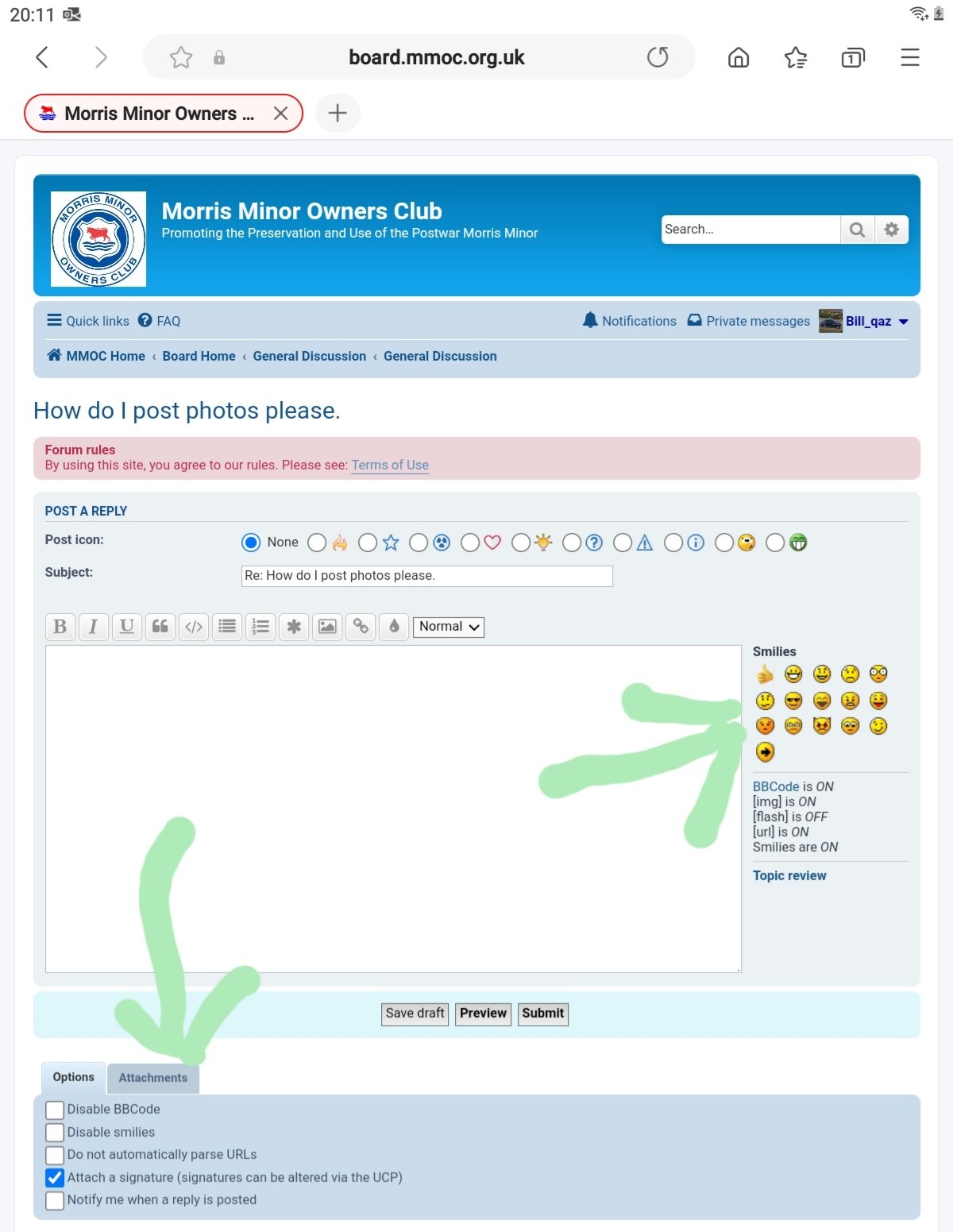
- Screenshot_20240602-201143_Samsung Internet.jpg (153.81 KiB) Viewed 974 times
Re: How do I post photos please.
Posted: Mon Jun 03, 2024 1:02 am
by Mercmancdi
Re: How do I post photos please.
Posted: Mon Jun 03, 2024 12:40 pm
by Bill_qaz
See you managed to post your
picture 
It always seems to favour landscape so pics end up rotated, I sometimes crop them to keep orientation but I'm sure someone will chip in in and suggest a simpler method.
Re: How do I post photos please.
Posted: Mon Jun 03, 2024 7:51 pm
by geoberni
Bill_qaz wrote: ↑Mon Jun 03, 2024 12:40 pm
See you managed to post your
picture
It always seems to favour landscape so pics end up rotated, I sometimes crop them to keep orientation but I'm sure someone will chip in in and suggest a simpler method.
There seems to be a bit of an issue
posting photos directly from a phone, it seems to assume that all images are not only Landscape, but also taken Right Handed, so the image is saved to the phone with that configuration.
I usually post from my PC, having transferred the photos to is. I find it's easier than trying to use the Forum on a phone small screen.
I think you're right, you need to Edit in some way to make the metadata attached to the image overwrite the basic settings the phone attaches to it.
Re: How do I post photos please.
Posted: Mon Jun 03, 2024 7:59 pm
by Mercmancdi
Thank you guys appreciate your advice still learning
Re: How do I post photos please.
Posted: Tue Jun 04, 2024 10:46 am
by Bill_qaz
geoberni wrote: ↑Mon Jun 03, 2024 7:51 pm
Bill_qaz wrote: ↑Mon Jun 03, 2024 12:40 pm
See you managed to post your
picture
It always seems to favour landscape so pics end up rotated, I sometimes crop them to keep orientation but I'm sure someone will chip in in and suggest a simpler method.
There seems to be a bit of an issue
posting photos directly from a phone, it seems to assume that all images are not only Landscape, but also taken Right Handed, so the image is saved to the phone with that configuration.
I usually post from my PC, having transferred the photos to is. I find it's easier than trying to use the Forum on a phone small screen.
I think you're right, you need to Edit in some way to make the metadata attached to the image overwrite the basic settings the phone attaches to it.
I don't have a pc, I'm working from a tablet which uses android, so no different than my phone. Cropping the
picture to change its size is the only way I've found. Even if I rotate the
picture and save it the forum flips it back. I assume it looking for the size of the pic to decide its orientation. It would be nice to have rotate as a choice as well as inline.